
Where a human should approve what an AI agent does
Put human approval immediately before an AI agent takes a hard-to-reverse action. Use this three-question test, worked example and review checklist.
A human should approve an AI agent immediately before a specific action that is hard to undo, reaches a customer, bank or public audience, or changes another person's records. Reversible internal actions can run with a record.

Put the human approval at the moment just before an action that is hard to undo, and ask the person to approve that one action, not the AI's general plan. Let everything that is easy to reverse run on its own, with a record kept. That rule protects the attention of the people doing the approving, because a person who is asked to approve every small step stops giving any single step a real look.
If you have ever clicked "approve" on something without fully reading it, you already know how this goes. It is rarely laziness. The request just looked like the forty before it. This post is about building approvals so that does not happen.
An AI agent is software that takes actions, such as sending a message or paying a bill, instead of only writing text. An approval gate is the point where it stops and waits for a person to approve, revise or decline the action. This post covers where the gate belongs, a three-question test for sorting actions, a worked example with illustrative numbers, what the approver should see and how Trunnion AI approaches the decision.
The rule: approve at the point of no return
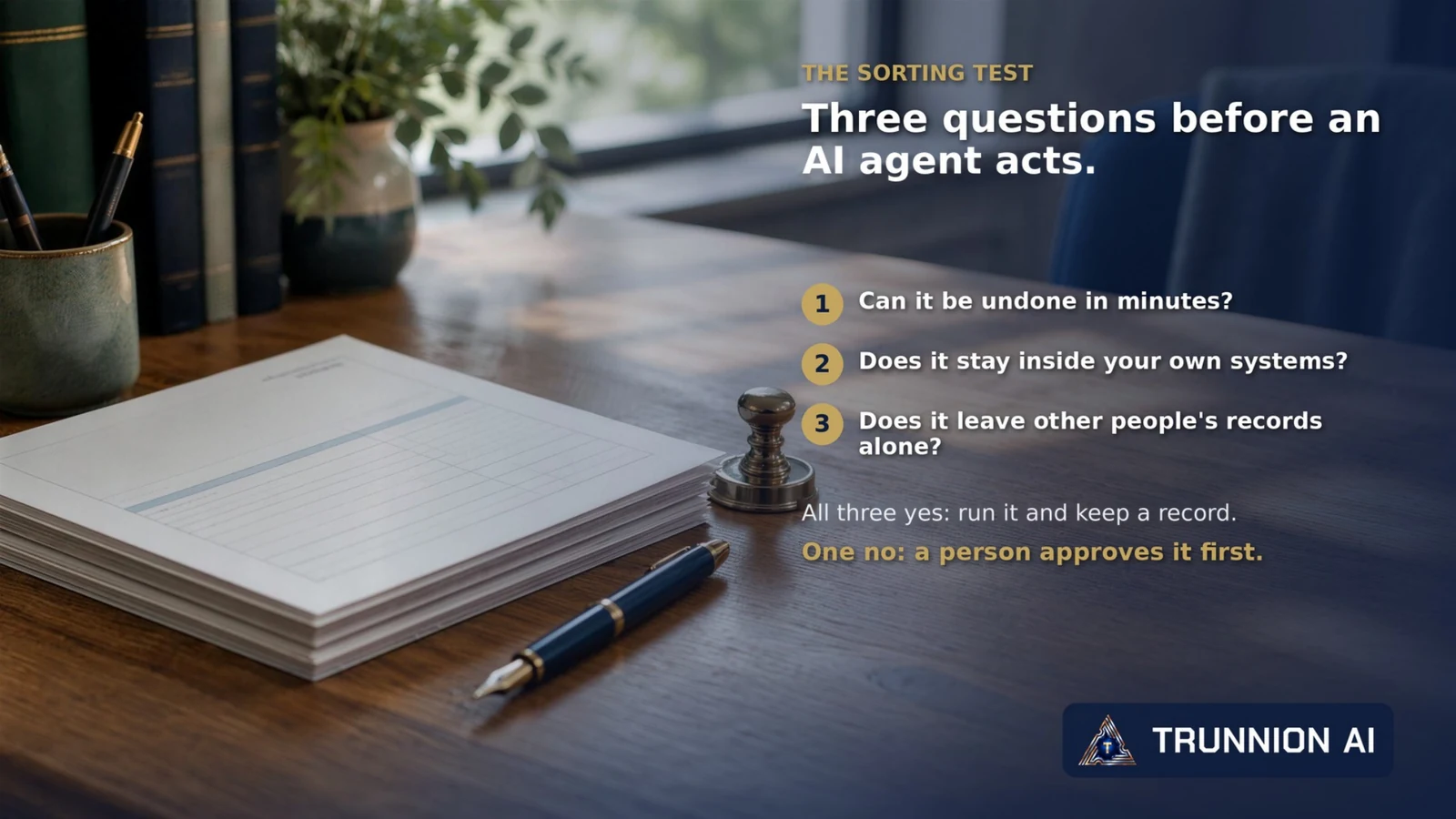
Ask three questions about every action an agent can take:
- Can it be undone in minutes?
- Does it stay inside your own systems, with no customer, bank or public audience on the other end?
- Does it leave other people's records alone?
If all three answers are yes, let the action run and keep a record. If any answer is no, put a person in front of it. That is our opinion, and it has company. The OWASP GenAI Security Project names excessive autonomy as one root cause of excessive agency. It recommends human approval for high-impact actions and uses deleting data and publishing content as examples.
| Question about the action | Yes means | No means |
|---|---|---|
| Can it be undone in minutes? | Lower risk | Needs approval |
| Does it stay inside your own systems? | Lower risk | Needs approval |
| Does it leave other people's records alone? | Lower risk | Needs approval |
One no is enough to bring in a person. If all three answers are yes, the action runs and the record is kept.
Worked example: an invoice agent
Illustrative numbers, not Trunnion data. An agent handles vendor invoices for a midsize company. It processes 50 invoices a day, and each invoice takes six steps.
| Step | Undo in minutes | Stays inside | Leaves records alone | Approval |
|---|---|---|---|---|
| Read the invoice | Yes | Yes | Yes | No, keep a record |
| Match it to a purchase order | Yes | Yes | Yes | No, keep a record |
| Draft a note to the vendor | Yes | Yes | Yes | No, sending is a separate action |
| Change the vendor's bank details | No | Yes | No | Yes |
| Release the payment | No | No | No | Yes |
| File the record | Yes | Yes | Yes | No, keep a record |
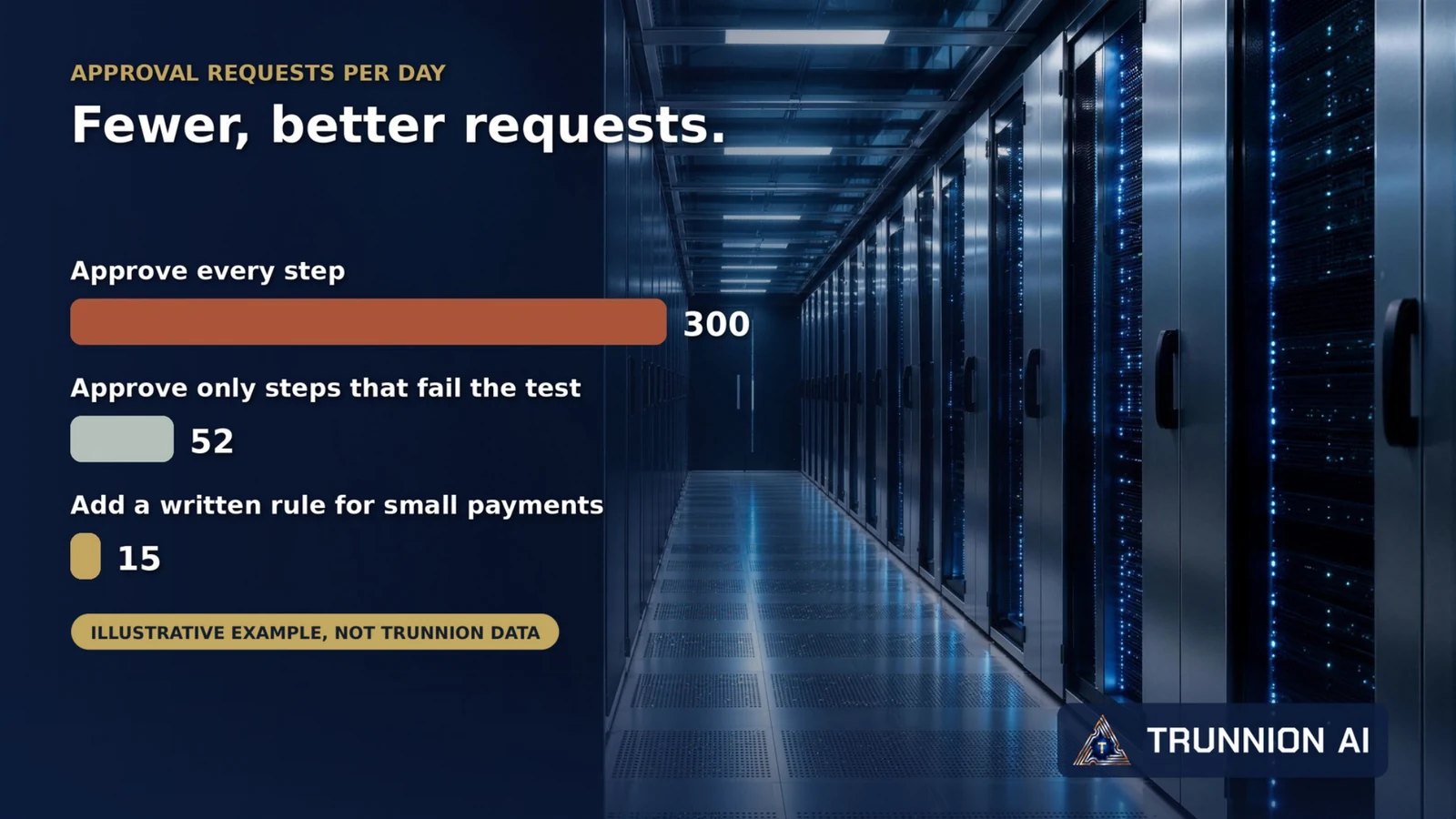
If a person approves every step, that is 50 invoices times six steps, or 300 requests a day. If a person approves only steps four and five, and the company changes bank details on two invoices a day, that is 50 payments plus two changes, or 52 requests.
Now add one company rule: payments under $5,000 to vendors already on file run with a record and a weekly sample. Suppose 10 payments a day are over that line, three go to a new vendor and two are bank changes. That is 15 requests, each one a decision that matters. The $5,000 line is a business decision, so write it down with an owner and a review date.
| Approach | Approval requests per day |
|---|---|
| Approve every step | 300 |
| Approve only steps that fail a test | 52 |
| Add a written rule for small payments | 15 |
Why not approve everything
It feels safer to put a person in front of every step. The research we found points the other way.
A hospital study examined how 112 primary care clinicians responded to computer alerts between January 2010 and June 2013. Each additional reminder per patient visit was associated with about a 30 percent reduction in the likelihood that a reminder was accepted. Repeat alerts for the same patient were also linked with lower acceptance. Approval requests are not clinical alerts, so this is an analogy. It matches the risk we are trying to avoid: as request volume rises, each request can receive less attention.
A second paper, from human-factors research on automation, found that complacency can appear when people carry more than one task at once. It appears in experts as well as beginners, and simple practice does not remove it. The authors also found that people can miss errors or follow bad advice when a decision aid is imperfect, and that training or instructions did not eliminate the effect.
More approvals do not automatically mean more safety. A gate that sees 300 requests a day is easy to click through. A gate that sees 15 can be read.
What the person should be shown
A gate only works if the person knows exactly what they are approving. A yes to "the plan looks fine" is weaker than a yes to one specific action.
Weak request, illustrative: "The agent wants to process today's invoice batch. Approve?"
Strong request, illustrative: "Pay $4,812.50 on invoice 1182 to the vendor with the bank account ending 4417, matched to purchase order 7731. Expected result: this vendor's open balance drops to zero."
The strong version shows the target, the key numbers, the evidence and the expected effect. Trunnion's frequently asked questions describe the same design: the reviewer sees the exact action, target, material parameters, relevant evidence and expected effect. The approval is bound to those parameters and expires. If the agent later tries a different amount, the old approval does not cover it.
Who approves, and what they can say
A gate needs the right person standing at it. That means someone who knows the subject and has authority to decide, not whoever happens to be free. Trunnion's How it works page describes the proposed work going to the role that holds decision authority.
The person also needs more than one path. A useful approval design lets the reviewer approve, revise or decline. A gate with only a yes button is a rubber stamp with extra steps. A revise path lets the person correct a small problem and keep the work moving, while a decline path stops the action cleanly.
Suppose the agent proposes paying invoice 1182 for $4,812.50, but the purchase order says $4,182.50. Two digits were swapped. With only yes or no, the reviewer either approves the wrong amount or rejects a valid invoice. With a revise path, the reviewer corrects the amount, approves the revised action and leaves a record of what changed.
After the decision, keep a record of who approved what and when. That is the part people skip, and it is the part they often want six months later.
How Trunnion AI approaches it
Trunnion AI builds governed agentic software around the work of a specific industry. Trunnion Core is the orchestration runtime and developer platform beneath that work. As of November 3, 2026, the Trunnion site lists Core as Live at the portfolio level.
The How it works page explains the public design approach: software can gather context, draft a response and organize a next step within a configured scope; proposed work and relevant context then go to the role with decision authority. The FAQ says a consequential action should pause before execution and describes a review record that connects identity, task, policy, approval, tool request, receipt, result and release context.
Two limits matter. Trunnion's pages describe designed or configurable capabilities, not certifications or proof of production controls. Features, controls and deployment options vary by release, configuration, environment and written agreement. Evaluate the exact release you plan to use.
Two mistakes and the fix
Mistake 1: the gate sits at the end. A team lets an agent run six steps and asks a person to review the final result. By then the payment is out. The fix is to move the gate to immediately before the step that fails the test.
Mistake 2: a gate sits on every step. The team asks for approval on reading, matching, drafting and filing too. The reviewer sees 300 requests a day and learns to click. The fix is to run the three questions and let the lower-risk steps through with a record.
One more habit: review the gates themselves. Put each gate on a 90-day review. If the same request is approved without a change for 90 days, ask whether it still needs a person or whether a written rule can take its place. If a gate is missing, the review is how you find out.
Run this week
- Write down every action your agent can take. List actions, not things it can say.
- Run the three questions on each action and mark every one with at least one no.
- Put a gate immediately before each marked action. Write what the approver will see: the target, key numbers, evidence and expected effect.
- Let the rest run with a record, and sample that record weekly.
- Name who is allowed to approve each gate, and provide approve, revise and decline paths.
- Count the requests one reviewer sees in a day. If the number is more than a person can read carefully, narrow it.
Talk to us
If you are deciding where a person belongs in your own agent workflows, request a technical walkthrough of the Trunnion AI platform built for your industry. Bring your own list of actions to sort.
Details current as of November 3, 2026. Next review February 2, 2027. Trunnion AI product pages describe designed or configurable capabilities and can change, so confirm current details before relying on them.
This article is for general informational and educational purposes only and is not legal, financial, medical or other professional advice. We make no guarantee that it is accurate, complete or current. The views expressed are those of the author and do not necessarily represent Trunnion AI. Use of this information is at your own risk.
This article may discuss strategy, possible capabilities, acquisitions, investments or market development. Those statements are forward-looking, uncertain and not commitments or guarantees. See the Website Terms of Use.
Sources
Accessed November 3, 2026.
- OWASP GenAI Security Project. LLM06:2025 Excessive Agency.
- Ancker JS and colleagues. Effects of workload, work complexity, and repeated alerts on alert fatigue in a clinical decision support system. BMC Medical Informatics and Decision Making, 2017.
- Parasuraman R and Manzey DH. Complacency and Bias in Human Use of Automation: An Attentional Integration. Human Factors, 2010.
- Trunnion AI. How it works.
- Trunnion AI. Trunnion Core.
- Trunnion AI. Frequently asked questions.
Direct answers
Frequently asked questions
When should a human approve an AI agent's action?
Require approval immediately before an action that cannot be undone in minutes, reaches a customer, bank or public audience, or changes another person's records.
Should every AI agent action require human approval?
No. Reversible actions that stay inside your systems and leave other people's records unchanged can generally run with a retained record. Approving every step can create review fatigue.
What should an AI approval request show?
Show the exact action, target, material parameters, supporting evidence and expected effect. The approval should be bound to those details and expire according to policy.
Who should approve an AI agent action?
The approver should understand the subject and hold authority for the decision. The workflow should offer approve, revise and decline paths rather than a single yes button.
How can a team reduce AI approval fatigue?
Gate only consequential actions, use written thresholds for routine cases, count the daily requests each reviewer receives and review the gates on a regular schedule.
What record should remain after an approval?
Keep the identity, task, policy decision, approval, tool request, receipt, result and release context needed to reconstruct what happened and who authorized it.